Why has the Magene C706 bike computer prompted me to lean over my bars for a closer look? Partly, because my social feeds are screaming with claims that it’s a Garmin Edge 1050 killer. So, I wanted to discover whether the hype around this bike computer is warranted. Is it good enough to break the grip the big three – Garmin, Wahoo and Hammerhead – have had on this market for years? Decades, in Garmin’s case.
Of course, Bryton has been valiantly chipping away at the edges of the market since 2011, and more recently, Coros made a sterling effort to bring unheard of reserves of battery life courtesy of its Dura computer. However, we’re now seeing a slew of Chinese brands attempt to break into the best cycling computers market, most notably iGPSport and Magene. Both promise parity with the big three on build quality, software and UI, while their sponsorship of WorldTour teams Groupama-FDJ United and XDS-Astana this season demonstrates just how serious they are about carving out a slice of the market.
Magene is aiming much higher with the C706, a sophisticated bike computer that rivals the big three’s range-toppers.
To wedge a foot in the door, some Chinese brands, such as Coospo and Geoid, offer sub-£100/$100 units boasting predictably basic functionality. Magene is aiming much higher with the C706, a sophisticated bike computer that rivals the big three’s range-toppers. Its price tag? Well, it isn’t dirt cheap, but it is provocatively competitive.
Latest Videos FromCycling Weekly
For example, bundle a Garmin Edge 1050 with a pair of Garmin Rally dual-sided power meter pedals – arguably one of the most useful training accessories for a bike computer – and you’ll be handing over a whopping £1,298/$1,899 for the privilege. Invest in a Magene C706 and a pair of Magene P715 dual-sided power meter pedals, and you’ll be spending about half that amount. That’s a huge saving.
Magene isn’t some fly-by-night operation, either. It has substantial OEM experience, producing electrical cycling products for brands such as Wahoo and Decathlon. So, its workforce knows how to screw tech together.
Design details
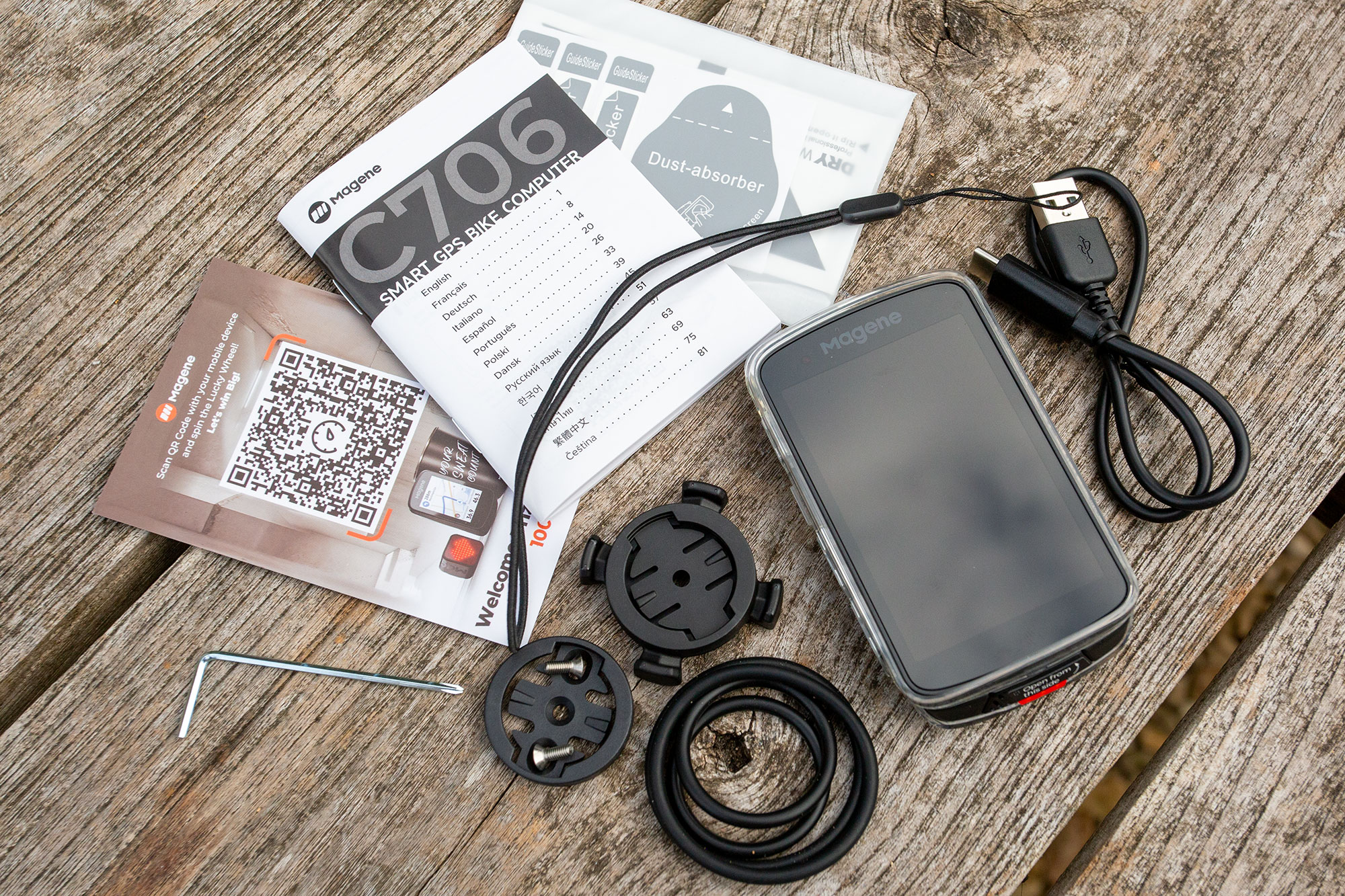
What’s in the box? The C706 is bundled with some nifty extras, including a TPU bumper and a screen protector. No proper out front mount, though.
(Image credit: Simon Fellows)
In the hand, the C706 looks and feels just as premium as flagship bike computers from the mainstays. Somehow, its build manages to convey a sense of weighty ruggedness despite tipping the scales at a respectable 111 grams. The alloy mounting boss quietly suggests quality and longevity – there are no cheap plastics to fail mid-ride here.
The large 3.3in colour touchscreen is the main feature, a backlit TFT panel that compares favourably in size to the Edge 1050’s 3.5in LCD display but is noticeably smaller than the Wahoo Elemnt Ace’s 3.8in transflective TFT behemoth. Unfortunately, Magene doesn’t publish specs for brightness, colour or resolution, which is a bit tiresome.
However, the C706 does impress with its thin bezel, allowing the generous 3.3in screen to be packed into a compact 55 x 97 x 14.8mm (2.2″ x 3.9″ x 0.6″) case. By comparison, the Edge 1050 is noticeably larger at 60.2 x 118.5 x 16.3 mm (2.4″ x 4.7″ x 0.6″). This makes the Magene a marginally more practical proposition on narrower bars and when space is tight on smaller third-party mounts.

The unit is about the same thickness as Garmin’s Edge 1050. Buttons – there are five in all – are a welcome inclusion.
(Image credit: Simon Fellows)
It’s great to see that Magene’s product design team has included five physical buttons, always a blessing when wearing winter gloves or when heavy rain makes every touchscreen I’ve ever tried intermittently unresponsive. The buttons – three on the left-hand side of the case and two on the lower edge, flanking the USB-C port – are contextual, but they provide quick access to common riding functions such as power on and off, page changes, laps, recording controls and the electronic bell.
That’s right, there’s an electronic bell, which means that Magene has incorporated a proper speaker, rather than the shrill piezo buzzers commonly found on even flagship head units until a couple of years ago. Unconventionally, it’s housed in the alloy mounting boss – more on that later. As well as the bell tone, spoken navigation prompts, climb notifications and a host of alerts can be voiced through the speaker.

The Star Ring is fun, but it’s difficult to see in bright daylight. Not least because it’s pretty much hidden from the rider’s view.
(Image credit: Simon Fellows)
Uniquely, the C706 features a slender 1mm ‘Star Ring’ light band that wraps around its front lip. This will illuminate in one of twelve colours of your choice and can be set to pulsate (‘Breathe’, in Magene-speak) or flash. Additionally, an alternative state – Breathing, Flashing, Steady or Close (off) – can be triggered when certain conditions are met. For example, you can program it to shine solid red if your heart rate exceeds a pre-set limit. This is achieved through Magene’s Smart Assistant, which uses If-This-And-That-Then-Do-This style logic. Smart Assistant is currently quite limited in use, but it can also alter lighting network settings, warn when it’s time to eat and let you know if you’re exceeding a preset speed, which is useful for shared-use paths. The tech is in beta but shows promise.
Magene says that a full charge, via the USB-C port at the unit’s bottom edge, should be enough to power a 17 to 25-hour adventure, depending on temperature conditions and individual configuration. When not in use, the port is protected by a weather and dust-resistant cover – in fact, the C706 is waterproof to IPX7, which is enough to withstand an unplanned dunking in up to a metre of water for 30 minutes.

More buttons at the rear of the unit, together with the usual cover to plug the charge port. The C706 is waterproof to IPX7, which is very good indeed.
(Image credit: Simon Fellows)
GPS functionality is dual-band, supporting five global systems: Beidou, GPS(L1+L5), Glonass, Galileo, QZSS. There are 8 gigabytes of storage on tap for global mapping, with all regions freely available via Magene’s OnelapFit app. Where Garmin and other competitors tend to ship their units with mapping largely pre-loaded, Magene requires you to download areas one at a time, which is slightly cumbersome but hardly a dealbreaker.
Navigation is thoroughly implemented. Maps can be zoomed and quickly switched from north-up to heading-up views. Should you ride off course, the C706 should re-route you to your destination or, if you prefer, to the nearest intersection. It’s also possible, via the OnelapFit app, to navigate back to start, save waypoints, generate custom routes and import GPX files. Unfortunately, it is not possible to input a destination directly into the C706, this can only be achieved via the app.

The display is clear, bright and colourful, which makes navigation at a glance a joy. However, note the almost non-existent radar lane on the left of the screen.
(Image credit: Simon Fellows)
Magene’s ClimbPro is similar to Wahoo’s Summit suite of climbing features and Garmin’s identically named ClimbPro. Just like the competition, Magene’s version of ClimbPro automatically identifies climbs within an imported route and displays key metrics such as current gradient, average gradient, climb length, elevation profile, remaining distance and remaining ascent. It also works in ‘Freeride’ mode, where the unit can detect nearby climbs without a preloaded route, show them on screen, and guide you to the start.

The Magene C706 feels like a sophisticated, quality piece of hardware. Sadly, the bundled mount does not.
(Image credit: Simon Fellows)
Generously, Magene includes a TPU case/bumper and a screen protector with the C706, accessories that other brands typically charge about £20/$20 for. However, I wish it had provide a decent out-front mount instead. All that’s supplied in the box is a cheap bar/stem mount held in place with rubber O-rings, together with a compatible insert that can be screwed into third-party out-front mounts.
Finally, Magene’s OnelapFit is the C706’s companion app, used to configure many of its settings, manage maps and routes, create or import structured workouts, sync rides and analyse training data. It also provides the bridge to services such as Strava, Komoot and TrainingPeaks. It’s available for both iOS and Android.
Performance

The uncluttered Home Screen is to navigate. The computer ships with just two outdoor ride profiles – Road is selected here – but it is easy to add more.
(Image credit: Simon Fellows)
Setup via the OnelapFit app is as routine as that of any of Magene’s competitors, with a couple of caveats. Essentially, it’s simply a case of registering a new account on a smartphone, then connecting the C706 via Bluetooth. Once you’ve entered your basic physiological attributes, connected the C706 to WiFi and downloaded any pressing firmware updates, you’re pretty much set.

The computer is managed via the OnelapFit app, shown here on an iPhone. It’s straightforward to use and fairly comprehensive. However, it is nowhere near as mature as competitor platforms such as Garmin Connect. Note the option to dial in a navigation destination, something that’s not possible directly on the C706.
(Image credit: Simon Fellows)
However, downloading mapping is an additional step. It doesn’t take more than five minutes, but an extra step is an extra step when you’re impatient to get riding. Fortunately, the process is slick. The app prompts you to trace a rectangle around your target area within a global map. I chose to focus on the north Cotswolds, which entailed a modest 34.3 megabytes of data, including offline navigation files and climbing data.
Another mild frustration is that the C706 ships with just two outdoor ride profiles: Road and Commute. If you’re a gravel rider, own an e-bike or dabble in mountain biking, then you’ll need to create appropriate profiles manually from scratch. Thankfully, this is also astonishingly easy to accomplish using OnelapFit.

More than 110 data fields can quickly and easily be added to both new and existing profile pages.
(Image credit: Simon Fellows)
New pages can be configured, and existing pages appended, with grids covering an entire gamut, from an uncluttered single column displaying a single metric to a dozen data-dense cells. More than 110 available data fields cover almost every conceivable conventional metric, from time, temperature and speed to heart rate, power, climbing and cycling dynamics.
This may sound a lot – it is a lot – but it’s outgunned by the huge depth of information available on Garmin devices. The US brand goes much deeper, with many more permutations of the same underlying metric. Take power, for example. The C706 might give you 3-second power, average power, normalised power, balance and so forth but Garmin adds 10-second and 30-second variants, watts/kg versions, lap versions, last-lap versions, %FTP and numerous cycling-dynamics derivatives. On top of that, Garmin offers a host of proprietary interpretive metrics, such as training readiness, Grit, Flow, Stamina, Training Effect and Performance Condition. Magene’s metrics are best summed up as comprehensive, whereas Garmin’s are exhaustive.

A Road Profile page, showing clearly legible data fields.
(Image credit: Simon Fellows)
Surprisingly, one area in which the C706 is lacking is e-bike support. It had no issue identifying the integrated power meter on my Specialized Creo, yet it failed to report e-bike battery level, assist mode, remaining battery range or any motor-related data. I understand this omission is common across all e-bike systems, whether you’re running a Bosch, TQ, Shimano STEPS, Yamaha, Mahle or whatever.
Support for other ‘sensors’ over ANT+ and Bluetooth 5.0 protocols is solid. Power meters, cadence sensors, radar, smart lights, Di2 and eTap are all catered for. You can even monitor and control a paired DJI or Insta360 action camera with the C706.
Unsurprisingly, the C706 reports outputs from Magene’s own range of power meters and communicates with third-party products – including Garmin Rally and Favero Assioma pedals. If you’re using these pedals (I wasn’t) the C706, in common with many other bike computers, will display Power Phase (where in the pedal stroke each leg produces positive power), Standing vs Seated Time and Platform Center Offset.

More data fields within another Road Profile page. Even on these pages, the radar lane is hard to see.
(Image credit: Simon Fellows)
The C706 can also act as a hub for compatible ANT+ bike lights, displaying their battery status and allowing lighting modes – solid, flash and so on – to be controlled from the head unit. My light network included a radar smart light, which introduced a major niggle for me. Many head units display the radar lane as a high-contrast solid bar at the edge of the screen. The C706’s lane is a trail of light grey chevrons, which are barely perceptible on most data screens and next to invisible on the map screen. Regardless of whether I was riding in bright sunshine or late-evening summer twilight, I couldn’t reliably make out the lane or the vehicle icons within it. Hopefully, Magene will re-think radar implementation in future firmware updates.

Why place the speaker within the mounting boss? Alerts and voice prompts can be hard to hear in heavy traffic and windy conditions.
(Image credit: Simon Fellows)
Unfortunately, my radar experiences highlighted another issue with the C706. The speaker is beautifully integrated into the alloy mounting boss, which is aesthetically pleasing but acoustically dumb. The speaker’s output – radar warnings, navigation prompts, bike bell and more – is muffled by the handlebar mount, making it difficult to hear in traffic, even with the volume manually turned up to 11. Voice commands become mumbled, and shrill alerts take on the soft, somniferous quality of meditation chimes.
At least the touchscreen is excellent. Well mostly. It cannot compete with the Edge 1050 for brightness, but I found it plenty legible enough under bright August skies. Colours are vibrant, contrast is good, and I didn’t find its comparatively low resolution a concern. Text and map renderings remain crisp, if not pin sharp.
The display is also fast and responsive, reacting quickly to prods and swipes from my forefinger. Sadly, Magene has shot itself in the foot with the TFT LCD screen, which on my test unit appeared completely black when viewed through polarised lenses. This is a massive issue for the many cyclists who’ve invested a large sum in polarised riding glasses. According to UK distributor Chicken Cycle, this doesn’t affect all units uniformly, with some more visible than others depending on the angle of view (the nature of polarisation).

Calling up existing routes is easy, and they load quickly.
(Image credit: Simon Fellows)
Provided you can see the C706’s display, navigation is mostly painless and dependable, especially with imported routes. With 3.3in of screen real estate and the inevitable bulk that goes with it, this is a computer that holds more appeal for leisure and endurance riders than crit racers, so it should excel at nav. Mapping is clear and uncluttered, and directions unambiguous, making routes largely effortless to follow.

Routes and direction prompts are clear and unambiguous.
(Image credit: Simon Fellows)
Creating those routes, however, does take a little effort. You can’t search for a destination address on the C706, this has to be entered into the OnelapFit app and the ride initiated from there. The route will then be imported across to the C706, which can take a few minutes.
You can, however, save locations – home, favourite cafes and so on – within OnelapFit and sync them over Bluetooth. The C706 populates a library of these ‘Frequent Locations’, which can be navigated to from anywhere within your current mapping region. In my experience, the C706 will only calculate one route option. If you deviate from it, the head unit will try to bring you back on course, but it doesn’t give you the luxury of several route options from the get-go. The route is not editable either.

Go off route, and the C706 can struggle to re-route.
(Image credit: Simon Fellows)
I found routing and re-routing idiosyncratic. Often, the C706 would route me down major A-roads rather than more cycle-friendly B-roads, yet it would also plunder the bridlepath network – legally rideable offroad tracks in the UK – with carefree abandon. An unwelcome segment on a road bike ride. Re-routing, if I lost my way, was also somewhat haphazard, and prone to occasional failure.
Within OnelapFit it is also possible to create routes by converting previous rides, selecting multiple points on the app’s map – exasperating on a smartphone screen – and importing GPX files. Routes can also be automatically synced from both Strava and Komoot.
Frankly, I rarely need routes developed on the fly, preferring to import pre-planned GPX files authored in software such as OS Maps. I also use Komoot – which integrates with OnelapFit – a lot, especially for overseas trips. Until the C706’s routing matures, I recommend you do the same; Komoot gets the vote for best routing planning in CW’s Cycling’s Best Apps guide.
Mapping does include street names, which are often quoted in turn-by-turn voice and screen prompts. In short, navigation is solid, provided you import GPX files or use a third-party service.

Once successfully re-routed, the C706 works flawlessly. I recommend using GPX files or a platform such as Komoot, rather than trying to develop a route within OnelapFit.
(Image credit: Simon Fellows)
Magene’s ClimbPro feature is clearly inspired by Garmin’s live climb profile tool of the same name. It works when following a route or in FreeRide mode, i.e. not following a route. Ride within 100 metres of a meaningful slope, and a ClimbPro popup displays a colour-coded elevation profile of the climb, showing your position on it alongside current gradient, distance remaining and remaining ascent. It also provides headline climb information such as total length, average gradient and elevation gain, helping you judge how hard the effort is and pace it accordingly.
In FreeRide mode, the C706 will detect and serve up profiles shortly before an ascent starts to bite, or budding KOM and QOM hunters can seek them out from a list of ‘Nearby Climbs’. This list can be filtered by Cat 4, 3, 2 and so on.
There are a couple of limitations. If you’re following a route, the ClimbPro profile popup is restricted to climbs on that route. Secondly, ascents must be at least 400m long and have a gradient of 2.5% or more. Be aware that many hills in the UK tend to be punchy but short, so they fail to meet these criteria.
I find climb profile tools genuinely useful, whether that be Garmin’s ClimbPro or Wahoo’s Summit. Magene’s ClimbPro is similarly gratifying. Up until recently, users complained about inaccuracies and inconsistencies, but Magene ironed out these buggy behaviours with firmware release v1.970.

Post-ride stats within OnelapFit are extensive – just a tiny selection is shown here – but the platform still lags behind services such as Garmin Connect.
(Image credit: Simon Fellows)
A large part of Garmin’s appeal – and Wahoo’s, for that matter – is its mature training and wellness ecosystem. Although some of Garmin’s more advanced training features sit behind its Connect+ subscription, there is still plenty available for free. Magene’s offer is more basic, but it does cover the essentials. OnelapFit provides Free Training for indoor smart-trainer control, with the choice of Target Power, Resistance Level or Grade Level; structured Workouts can be created in the app or imported from TrainingPeaks; and Simulated Routes allow a compatible trainer to recreate the changing gradients of a chosen course.
What’s missing is the deeper coaching layer offered by Garmin, such as adaptive training plans, suggested workouts and more sophisticated physiological analysis.
Finally, battery life. This is always tricky to evaluate because so much depends on temperature and the number and variety of sensors connected. My C706 was only exhausted after a respectable 20 hours of riding. This was in high summer, with ambient temperatures in the region of 24 – 32°C (75.2–89.6°F). Radar and power meters were always connected. This is impressively close to Magene’s claimed 17 – 25-hour range. Charging from 20-percent battery to full took about an hour and forty minutes.
Value

The Magene C706 is packaged as a premium product, yet its price significantly undercuts the competition.
(Image credit: Simon Fellows)
Well, is the Magene C706 a Garmin Edge 1050 killer, a slayer of Wahoo Elemnt bike computers? No, but I believe it is one of the most significant GPS head unit launches of recent years. In terms of hardware and build quality, Magene has very nearly achieved parity with the big three. Only the silly polarised lens issue and speaker placement let it down.
When it comes to UI and software, it falls short. Way short when I consider just how deep Garmin’s training and wellbeing ecosystem is. Yet, for many cyclists – those who have little interest in training routines, sleep patterns and a thousand and one metrics – none of that matters.
What does matter is price and value. Price is fixed; value depends on how much of a power user you are (or have pretensions of becoming). If your requirements sit at the upper end of modest – decent nav, connectivity to radar, power, a bell etc – then you’ll be delighted with the C706. My only real gripes are poor radar integration and somewhat unreliable onboard nav routing and re-routing. Hopefully, these will both be addressed in future firmware updates.
Currently, the Garmin Edge 1050 retails for £599.99/$699.99, the Hammerhead Karoo for £449.99/$525 and the Wahoo Elemnt Roam 3 for £399.99/$449.99. The Magene C706 retails for £239/$229. I’ll leave you to do the maths.
Specs

Pretty pointless but fun. The default Road Profile screen features a huge speedometer. Useful, perhaps, on shared paths.
(Image credit: Simon Fellows)
- Price: £239/$229.
- Screen Size: 3.3 inches
- Weight: 111g (verified)
- Waterproof: IPX7
- Charging Port: USB-C
- Battery Life: 17-25 hours claimed, which is plausible
- Storage: 8gb
